
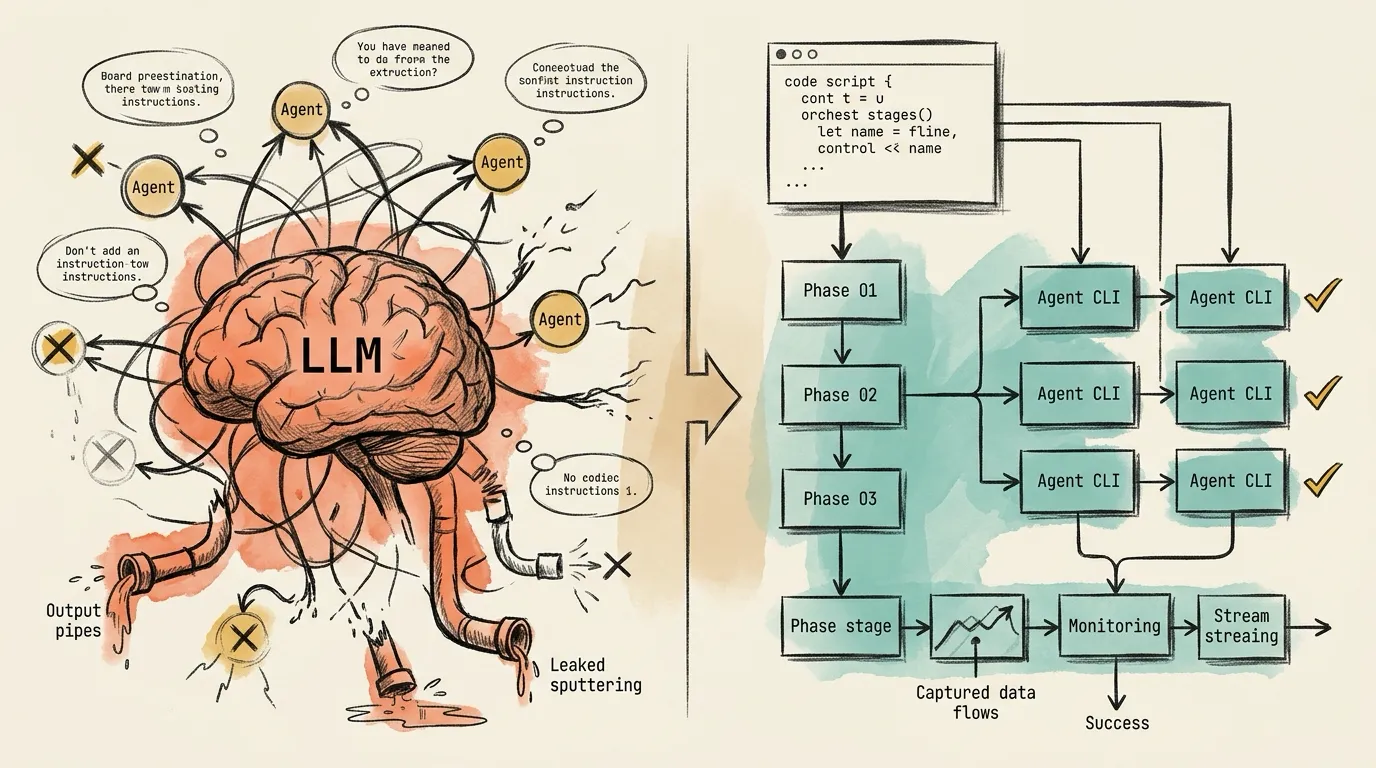
Running one AI coding agent interactively is straightforward. The trouble starts when several agents (Claude Code, Codex CLI, Gemini CLI) have to work together in a pipeline that must run the same way every time. Then you have to decide: do you let an LLM orchestrate the agents, or do you write code that does it?
I’ve built four multi-agent systems:
- Planora, an implementation planner. Claude writes a plan, Gemini and Codex audit it in parallel, and Claude refines it.
- An article research pipeline with asset generation.
- A performance audit and code review system that runs five agents (Claude, Codex, Gemini, and OpenCode with two model providers) in parallel across eight categories.
- Raven, a Go CLI built on my extended version of the Ralph loop, a bash script that runs a coding agent repeatedly until every item in a product requirements document is done.
By the fourth system, I noticed I kept rebuilding the same infrastructure: subprocess management, stream parsing, rate-limit recovery, stall detection, and resume. Each time, I had made the same architectural choice without realizing it.
This article compares the two answers on reliability, prompt control, observability, and cost. It then covers a third option: an orchestration engine that packages the headless approach as a library.
The Spectrum: Three Modes
Mode 1: Interactive. You work in a Claude Code or Codex session and steer the agent as it goes. To delegate, you use subagent .md files, slash commands, or the Agent tool. The orchestration logic lives in the model’s reasoning.
Mode 2: Headless. You call an agent CLI non-interactively (claude -p, codex exec, gemini -p) and capture the output. A script chains the calls and controls the flow.
Mode 3: Orchestration engine. This is what headless scripts turn into once they need dependency-ordered phases, parallel runs with concurrency limits, parsers for each agent’s output stream, rate-limit handling, and resume from the phase that failed.
The question is whether Mode 1 can grow into a real orchestration system, or whether Mode 2 is the only workable foundation.
Two Ways to Build Orchestration
Take Planora’s pipeline: Plan → Audit (in parallel) → Refine → Report. Claude writes a plan with 12 required sections, Gemini and Codex each check it against 10 audit categories, and Claude revises it using their findings. In blind LLM-as-a-judge benchmarks, this scored 87, against 61 for Claude Code’s native plan mode.
In the interactive version, you describe the pipeline to Claude. Claude spawns a planning subagent, reads its output, spawns the auditors, reads theirs, and spawns a refiner. Claude decides when to delegate, writes every subagent’s prompt, and decides what to do with the results.
In the headless version, a Python script runs claude -p with a prompt rendered from a Jinja2 template, then runs gemini -p and codex exec in parallel, feeds their output into a final claude -p, and archives everything.
The pipeline is the same, but the two execution models have almost nothing in common.
Reliability and Determinism
Interactive orchestration fails in four ways that matter for pipelines.
Claude may skip the delegation. Ask it to spawn a subagent for the plan and, in some runs, it writes the plan itself, without the template or its 12 sections. Others see the same: one feature request asks for a mode that forces delegation because Claude routinely ignores CLAUDE.md instructions to delegate. It was closed as not planned.
Output can get lost. In one reported five-agent session, two background agents finished, but one returned empty content and the other returned raw transcript JSON instead of a summary (resuming them recovered the output). The report was merged into #14055, which was closed as not planned. If the next phase needs every result, it runs on incomplete data, and the orchestrator may not notice.
Parallelism is up to Claude. You can ask for parallel subagents, but you can’t enforce it.
Compaction can lose the team. Long sessions get compacted, and an open issue reports that the lead of an agent team then loses track of its teammates.
Headless avoids all four by construction. The pipeline logic is ordinary Python, so it runs the same way every time. Output reaches files through stdout, stderr, and exit codes instead of message passing, and concurrency is set in code with asyncio.Semaphore. Each agent is a stateless subprocess, so there is no context to compact: phase 3 only needs the files that phases 1 and 2 wrote.
Prompt Control and Multi-Provider Support
In interactive mode, an LLM sits between you and your subagents. You control each subagent’s system prompt through its .md file, but Claude writes the task prompt, which holds the actual instructions, and you can only read it after it’s sent. Ask for an audit across exactly 10 categories and Claude may send 8, merge two, or add one of its own. The prompt drifts from run to run.
An audit request for 10 categories, marked to show the lead agent sent 8: two merged into one, two dropped and one of its own added.
Audit the plan against these 10 categories.

 1. completeness
 2. feasibility
 3. dependencies
 4. risk
 5. security
 6. testing
 7. performance
 8. sequencing
 9. scope
10. rollback
The Agent tool also only spawns Claude subagents. To bring in Gemini or Codex, Claude has to call their CLIs through its Bash tool, which is headless orchestration with an LLM deciding when to run it.
In headless mode, the prompt is a string you control:
claude -p "exact prompt"
codex exec "exact prompt"
gemini -p "exact prompt"
My prompts are Jinja2 templates with structural contracts (12 required sections for a plan, 10 categories for an audit), and they live in git, so I can diff them between runs. Any agent CLI on PATH can be a step. The real cost of adding a provider is a parser for its output stream.
Debugging, Resume, and Observability
Headless gives you observability by default, because the operating system keeps the record. Every prompt comes from a template in git, every agent event lands in a JSONL stream file, and every failure leaves an exit code and a log. Completed phases are recorded, so a rerun can start at the phase that failed. In Planora, if one auditor fails, refinement goes ahead with the reports that arrived.
In interactive mode, you see what Claude chooses to tell you. You can’t change a subagent’s prompt before it runs; you can only read it afterward.
Resume restores a conversation, not a pipeline: if a subagent fails, you restart the session, the plan phase runs again even though it succeeded, and Claude may delegate differently the second time. Resume has had bugs of its own, such as lost prompts, forked context, 400 errors, and crashes on large sessions, although all four issues have since been closed.
Cost, Token Efficiency, and Parallelism
In interactive mode, the main session spends tokens on coordination: reading subagent results, deciding what to do next, and writing delegation prompts. A script makes the same decisions at no token cost. Parallel agents multiply the bill because each has its own context window. Anthropic’s cost documentation says agent-team usage grows roughly in proportion to team size, and puts it at about 7x a normal session when teammates run in plan mode (October 2026). All of those agents share one account’s rate limits.
Headless spends no tokens on coordination. Each subprocess picks its own --model (Opus to plan, Sonnet to audit, Haiku for quick checks), and Claude, Gemini, and Codex have separate rate limits, so they don’t compete for the same quota.
The Scorecard
Here is how I score the two approaches across 11 dimensions after building these four systems:
Interactive wins on setup speed (a few .md files and you’re running in minutes) and on runtime flexibility (the model adapts to surprises). Headless wins the other nine. Rebuilding the headless infrastructure for every project is wasteful, though, so I extracted it.
orchcore: The Reusable Orchestration Core
After building the same headless infrastructure four times, I pulled the common layer out into a library, orchcore.
Three layers: each project's workflow on top, orchcore in the middle, the agent CLIs at the bottom.
- Pipeline definitions
- Prompt templates
- Output interpretation
- Presentation
- Agent selection
- Agent registry
- Stream pipeline
- Phase engine
- Config
- Prompt engine
- Recovery
- Display UI
- Signal handling
Each project keeps its own workflow layer: phases, prompt templates, agent choices, and UI. As of version 2.0.1, orchcore provides the rest:
- An agent registry. A CLI that emits one of the five supported stream formats (Claude, Codex, Gemini, Copilot, or OpenCode) can be added in TOML without code changes.
- A stream pipeline that filters noise before any JSON parsing, normalizes the five formats into one event type, tracks each agent in a 9-state machine, and flags agents that go silent for 300s (600s for deep tools such as web research).
- A pipeline runner that rejects dependency cycles, runs phases in dependency order, limits parallelism with a semaphore, and resumes from a named phase.
- Recovery: rate-limit detection, reset-time parsing that understands timezones (“resets 7pm Europe/Berlin”), retries on a backoff schedule with jitter, and a git auto-commit or stash before each retry.
- A
UICallbackprotocol with 15 typed events, so orchcore never imports a UI framework and each project brings its own, whether that’s a Textual TUI, a Rich CLI, or the built-in logging callback for CI. - Layered configuration from CLI flags,
ORCHCORE_*environment variables,.envfiles, TOML files, andpyproject.toml, with named profiles such as “fast” and “deep”.
orchcore is open source. You can install it from PyPI with uv pip install orchcore, and the code and documentation are on GitHub.
When to Use Each Approach
Interactive orchestration is the right tool when you don’t know the steps yet: exploration, prototyping, one-off tasks, small jobs with one or two subagents, and work where you want to steer between steps. A model that adapts to surprises helps there.
Headless is for pipelines that must run reliably every time, use more than one provider, or need reproducibility, resume, retries, model tiering, and real observability. Use interactive orchestration to discover what a pipeline should be, and headless to run it once you know.
The Production Reality
Some of the failures above are bugs that may get fixed. The underlying problem won’t go away: when orchestration lives in an LLM’s reasoning, you’re asking a probabilistic system to behave deterministically. Interactive mode is the wrong tool for a production pipeline in the same way a REPL is the wrong tool for CI.
Orchestration is a code problem, not a prompting problem. It took me four systems to see that.
References
- Anthropic, “Run Claude Code programmatically”: https://code.claude.com/docs/en/headless
- arXiv 2603.20847, “Engineering Pitfalls in AI Coding Tools: An Empirical Study of Bugs in Claude Code, Codex, and Gemini CLI”: https://arxiv.org/html/2603.20847
- bradAGI, “awesome-cli-coding-agents”: https://github.com/bradAGI/awesome-cli-coding-agents
- Stack Overflow Blog, “Are bugs and incidents inevitable with AI coding agents?”: https://stackoverflow.blog/2026/01/28/are-bugs-and-incidents-inevitable-with-ai-coding-agents/
- Addy Osmani, “Top AI Coding Trends for 2026”: https://beyond.addy.ie/2026-trends/
- SFEIR Institute, “Headless Mode and CI/CD”: https://institute.sfeir.com/en/claude-code/claude-code-headless-mode-and-ci-cd/
- Anthropic, “Manage costs effectively”: https://code.claude.com/docs/en/costs
- snarktank, “Ralph”: https://github.com/snarktank/ralph
- orchcore, “Reusable orchestration core for multi-agent CLI pipelines”: https://github.com/AbdelazizMoustafa10m/orchcore